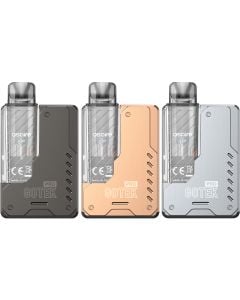


Aspire Pixo pod vape kit

The Aspire Pixo pod vape kit is an easy-to-use device that offers fast charging, adjustable wattage & airflow, a 1.47" HD colour screen, built-in safety protections & more.
-

Free UK delivery on all orders over £20
-

Same day despatch - order by 5pm
-

Next working day delivery available
Orders placed before 5pm Monday to Friday using the next working day delivery service are despatched same day (excluding bank holidays).
For standard delivery services we also despatch orders placed before 5pm on the same day weekdays excluding bank holidays.
The Aspire Pixo pod vape kit is designed for all types of vapers offering a user-friendly interface and up to a full day of vaping on a single charge. This fast-charging vape takes only 35 minutes to fully recharge the built-in 1100 mAh internal battery.
Additionally the Aspire Pixo can be used for a variety of vaping styles including mouth-to-lung (MTL), direct-to-lung (DTL) & restricted direct-to-lung (RDTL) allowing you to find what works best for you.
- 1.47" TFT HD colour touchscreen
- Adjustable side airflow
- 30 watts of adjustable power
- Smart & wattage modes
- Button or draw activated
- Built-in safety protections
- 1100 mAh internal battery
- Fast-charging
This device offers a variety of adjustable settings, such as smart mode which detects your pods best wattage, adjustable wattage to fine tune your power, screen themes & more which are accessed via the HD touchscreen.
Furthermore, this pod vape kit features an ASP integrated chipset to provide eight built-in protections such as short circuit, low voltage, over heat & more.
Features
- Wattage range: 5 - 30 W
- 1.47" TFT HD colour touchscreen
- Smart & wattage modes
- Adjustable side airflow
- Button or draw activated
- Built-in safety protections
- 1100 mAh internal battery
- Fast-charging
Pods compatible with the Aspire Pixo pod vape kit
The Aspire Pixo pod vape kit is compatible with Aspire Pixo replacement pods which are available in three resistances & feature an easy side-fill port.
What is in the box: Aspire Pixo pod vape kit
When you choose the Aspire Pixo pod vape kit you will receive:
- 1 x Aspire Pixo device
- 1 x Aspire Pixo 2ml refillable pod 0.4 ohm
- 1 x Aspire Pixo 2ml refillable pod 1.0 ohm
- USB-C charging cable
- User manual
Aspire Pixo set up guide
- Remove the preinstalled pod from the device. The Aspire Pixo comes with a 0.4 ohm pod installed but also comes with a 1.0 ohm pod. You can select your preferred pod to get started with. If you opt for the 0.4 ohm pod be sure to remove the sticker from the base.
- Unplug the orange silicone stopper from the side of the pod and insert the nozzle of your e-liquid bottle. Fill the pod to around two thirds full and allow to sit for 5 minutes before using to give the e-liquid time to absorb.
- Insert the pod into your device and press the fire button five times in quick succession to turn your Aspire Pixo kit on.
- The device offers adjustable wattage between 5 – 30W. The current wattage setting is displayed on the screen and the recommended wattage range for your chosen pod is displayed below this. To adjust the wattage swipe down twice on the touchscreen then press the +/- icons to select your wattage. Press the fire button to confirm your selection.
- Press the fire button three times to enter the settings menu. To switch between modes, enter the ‘output modes’ menu and choose between ‘smart’ or ‘watt’. The device will already be in watt mode, allowing you to manually adjust the wattage. Smart mode allows the device to automatically set the wattage to the best suited setting for your chosen pod.
- The setting menu also allows you access to other features like the puff record, vibration settings and AB settings.
- Use the three-tiered airflow switch on the side of the device to choose your preferred airflow setting.
- Because the pod is transparent it is easy to monitor how much e-liquid you have remaining. When the e-liquid is running low, you can top it up by removing the pod and accessing the filling port.
- The Aspire Pixo pods can be refilled multiple times before they will need to be replaced. But, when you start to notice the flavour has become burnt, bitter or muted it is time to replace the pod. Remove the used pod and replace it using the same easy steps as you did with the first pod.
- Your remaining battery power is shown at the bottom of the display. When it is time to recharge, connect the device to a suitable power source via the included USB-C charging cable. The battery percentage on the screen will increase until it reaches 100%, letting you know when it is ready to remove from charge.